


- By Sangeetha Mahesh
- June 15, 2026
Quick Summary:
Seva Sindhu registration is the one-time, Aadhaar-based account creation process on the Government of Karnataka's official citizen services portal, sevasindhu.karnataka.gov.in. To complete Seva Sindhu new registration: visit the portal, click "New User? Register Here," enter your 12-digit Aadhaar number, verify with the OTP sent to your Aadhaar-linked mobile number, give DigiLocker consent for KYC, fill in your name, email, and address, and submit. Once registered, you can apply for 880+ government services — certificates, welfare schemes, transport services, and more — all from a single login.
If you've ever needed an income certificate, caste certificate, ration card correction, or had to apply for a Karnataka government welfare scheme, you've probably heard of Seva Sindhu — Karnataka's centralized e-governance portal. Launched in 2017 under the Government of India's e-District Mission Mode Project, Seva Sindhu now connects citizens to 880+ services across 50+ departments, from a single online account.
But before you can apply for any of these services, you need to complete Seva Sindhu registration — and this is where most people get stuck. Between Aadhaar-linking requirements, OTP verification issues, and DigiLocker consent steps, the registration process trips up a surprising number of applicants every day.
This guide walks you through Seva Sindhu portal registration step by step — what you need before you start, how to register correctly the first time, how to log in afterward, what to do if your Aadhaar isn't linked to your mobile number, and how to track your application once you've applied for a service.
If you'd rather have someone handle the entire process — registration, document preparation, and application filing — SriMas Associate assists Bangalore residents with Seva Sindhu registration and a wide range of certificate and licence applications. Contact us here.
What Is Seva Sindhu?
Seva Sindhu (ಸೇವಾ ಸಿಂಧು, meaning "Ocean of Services") is the Government of Karnataka's unified online platform for delivering citizen services digitally. It was launched to eliminate the old system of visiting multiple government offices — Revenue, Transport, Social Welfare, Education — each with its own application process, paperwork, and timelines.
Today, the portal is built on the ServicePlus framework (developed under the Ministry of Electronics and IT's e-District Mission Mode Project) and integrates with Karnataka One and Common Service Centres (CSCs) across the state, giving citizens both online and assisted offline access.
Through Seva Sindhu, residents can:
- Apply for income, caste, domicile, birth, and death certificates
- Apply for and manage ration cards under the Public Distribution System (PDS)
- Access Transport Department services — driving licences, vehicle registration, and road tax payment
- Apply for welfare schemes like Gruha Lakshmi, Gruha Jyothi, Yuva Nidhi, and educational scholarships
- Pay property tax and utility bills
- Register grievances and complaints
- Track the status of any submitted application using a unique reference number
Every application submitted on Seva Sindhu generates a unique acknowledgement/token number, which serves as your reference for tracking and follow-up.
Why Do You Need Seva Sindhu Registration?
Seva Sindhu registration is mandatory before applying for any service on the portal. Without a registered account, you cannot:
- Submit an application for any certificate or scheme
- Upload supporting documents
- Track the status of your applications from your dashboard
- Receive SMS/email updates on application progress
- Access your saved applications for future reference or renewal
The registration process is Aadhaar-based, which the government uses to verify your identity and prevent duplicate or fraudulent accounts. This is why the single most important prerequisite for Seva Sindhu new registration is having a mobile number linked to your Aadhaar card.
Documents Required for Seva Sindhu Registration
The good news: Seva Sindhu new registration itself requires minimal documentation. Here's what you need:
For Registration (Mandatory):
- Aadhaar Card — your 12-digit Aadhaar number
- Aadhaar-linked mobile number — to receive the OTP for verification
- Email ID (recommended) — to receive confirmation and application updates
For Applying to Specific Services (As Needed Later):
Once registered, the documents required will depend on the specific service you apply for. Commonly requested documents across services include:
- PAN Card — for income-related certificates and financial services
- Address proof — utility bill, ration card, or rental agreement
- Identity proof — voter ID, driving licence, or passport
- Income certificate — for scholarship and welfare scheme applications
- Caste certificate — for reservation-based services and scholarships
- Educational certificates — for student-related schemes like Yuva Nidhi
- Bank account details — for direct benefit transfer (DBT) linked schemes
Not sure if your property qualifies? SriMas Associate conducts a thorough eligibility assessment before any application is filed — call us at +91 99647 50123.
How to Complete Seva Sindhu New Registration — Step by Step
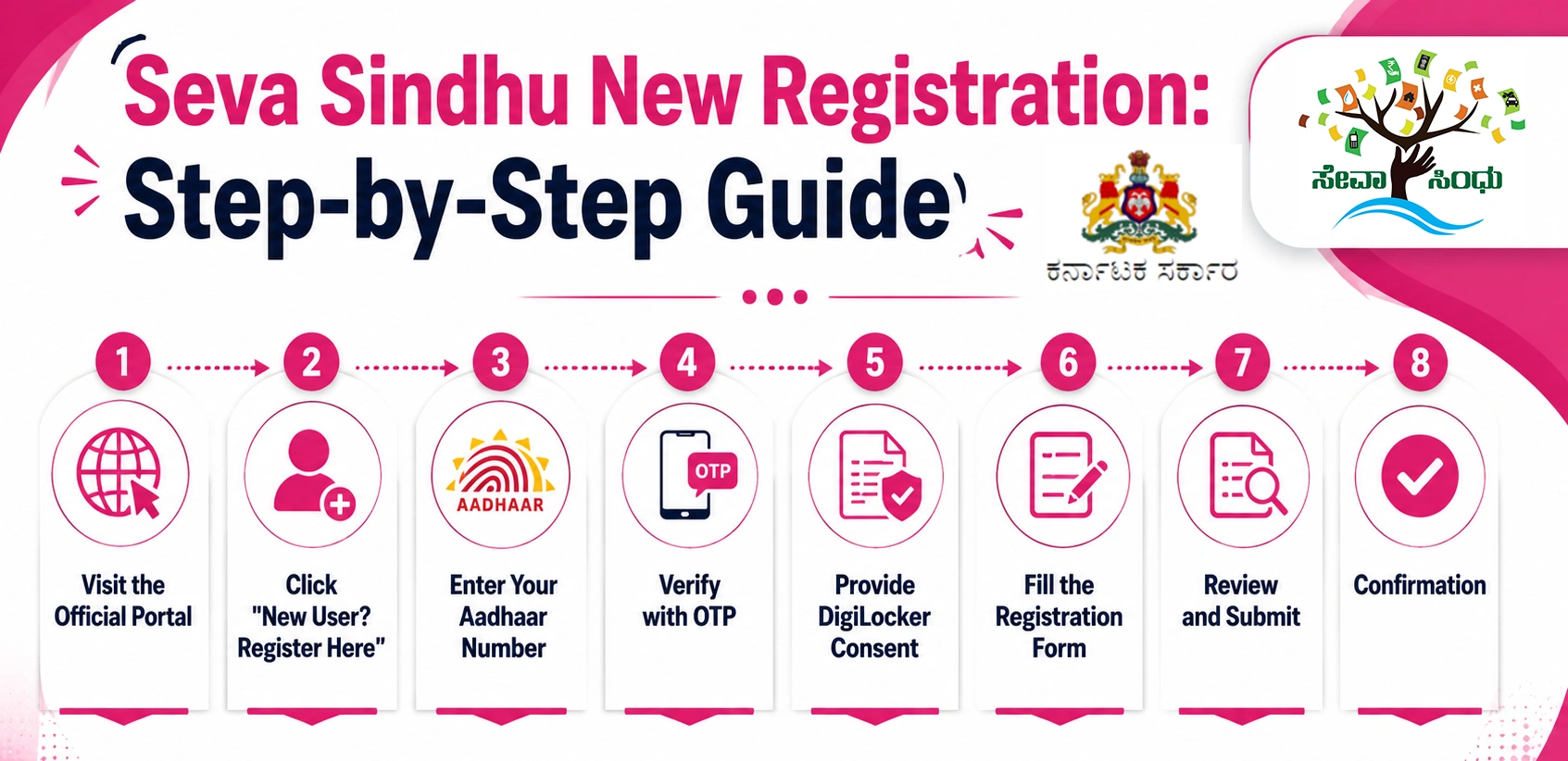
Here is the complete, current process for Seva Sindhu portal registration:
Step 1 — Visit the Official Portal
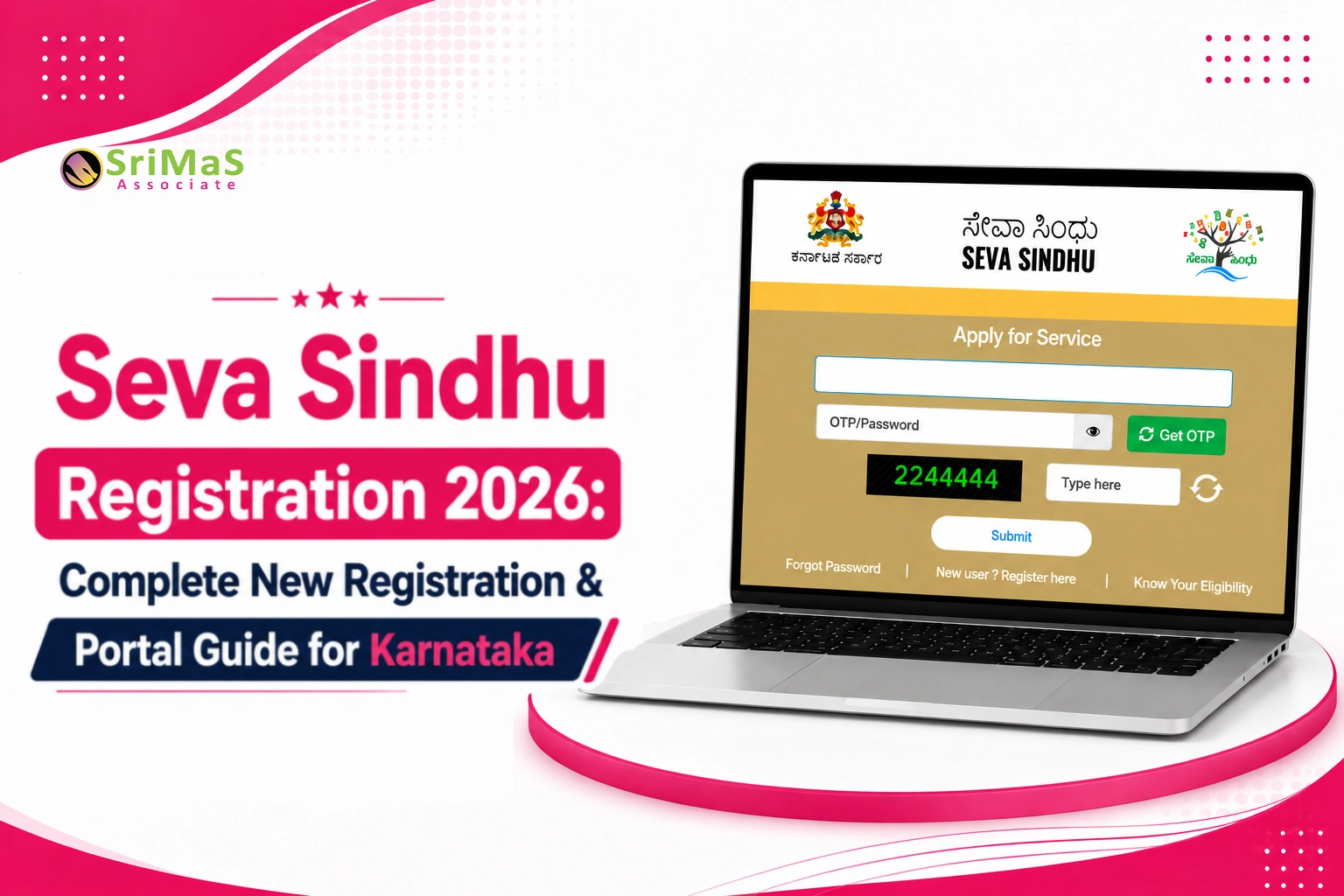
Go to the official Seva Sindhu portal at sevasindhu.karnataka.gov.in or sevasindhuservices.karnataka.gov.in. Be careful to use the official .karnataka.gov.in domain — several look-alike websites exist that are not government-operated.
Step 2 — Click "New User? Register Here"
On the homepage, locate and click the "New User? Register Here" option. This will redirect you to the Aadhaar-based authentication and DigiLocker verification page.
Step 3 — Enter Your Aadhaar Number
Enter your 12-digit Aadhaar number and complete the CAPTCHA verification. Click Next to proceed.
Step 4 — Verify with OTP
An OTP (One-Time Password) will be sent to the mobile number linked with your Aadhaar. Enter the OTP within the validity window (typically 10 minutes) and click Continue.
Step 5 — Provide DigiLocker Consent
The portal will request your consent to access documents such as your Aadhaar and PAN from DigiLocker for KYC purposes. Click Allow to proceed — this step speeds up document verification for future applications.
Step 6 — Fill the Registration Form
After OTP verification and consent, you'll be directed to the registration form. Enter:
- Full name (as per Aadhaar)
- Mobile number
- Email ID (if available)
- Address and district details
- A strong password for your account
Step 7 — Review and Submit
Double-check all entered details for accuracy — especially your name, mobile number, and email, since these will be used for all future communication. Complete the CAPTCHA, tick the declaration checkbox, and click Submit.
Step 8 — Confirmation
Once submitted, you'll see an on-screen confirmation message, and you'll receive a confirmation SMS or email with your account details. Your Seva Sindhu account is now ready to use.
How to Log In to Seva Sindhu After Registration
Once registered, logging in is straightforward:
- Visit sevasindhuservices.karnataka.gov.in
- Enter your username — this is the mobile number or email ID you registered with
- Enter your password, or click "Get OTP" to log in via OTP instead
- Complete the CAPTCHA verification
- Click Submit to access your dashboard
Forgot your password? Use the "Forgot Password" option on the login page to reset it via OTP verification.
Security note: As per the Seva Sindhu portal's password policy, it's recommended to change your password approximately every 3 months.
What Can You Do After Registering on Seva Sindhu?
Once your account is active, applying for a service follows a simple pattern:
- Log in to your dashboard
- Search or browse for the required service by department (Revenue, Transport, Education, Social Welfare, etc.)
- Select the service and fill out the application form with the required details
- Upload supporting documents in the specified digital format
- Submit the application — you'll receive a unique acknowledgement number
- Track your application status using this reference number
How to Track Your Seva Sindhu Application Status
You can check your application status in two ways:
Method 1 — Without Login (Fastest) Go to sevasindhu.karnataka.gov.in → click "Track Application Status" → enter your application reference number and submit.
Method 2 — After Login Log in to your dashboard → click "View Status of Application" → select "Track Application Status" → enter the date range and reference number → submit.
If your application has been pending for an unusually long time (15+ days), note the department name from your application and contact the relevant department helpline, or the Sakala grievance helpline at 1800-425-0101 for escalation.
Seva Sindhu Helpline and Support
If you face issues during registration or application that you cannot resolve online, the official Seva Sindhu helpdesk can assist:
- Phone: 080-22279954 / 8792662814 / 8792662816 (All working days, excluding government holidays, 10:00 AM – 6:00 PM)
- Email: sevasindhu@karnataka.gov.in
- Sakala Grievance Helpline: 1800-425-0101 (for escalating delayed applications)
- In-person: Nearest Common Service Centre (CSC), Karnataka One centre, or Seva Sindhu Service Centre
Need Help With Seva Sindhu Registration or a Government Application?
While Seva Sindhu registration itself is designed to be self-service, many residents — especially those applying for certificates linked to property, business, or compliance purposes — find the process of gathering the right documents and filling forms correctly time-consuming and confusing.
SriMas Associate assists Bangalore residents and businesses with a wide range of government registrations and certificate applications that often connect with the Seva Sindhu ecosystem, including:
- Online Marriage Certificate registration in Bangalore — for marriage registration certificates
- BBMP Khata Transfer — for property record updates
- BBMP E-Khata Services — for digital property documentation
- Property Registration Process in Bangalore — end-to-end property registration support
- Society / Association Registration in Karnataka — for RWAs, trusts, and associations
- KPME Registration — for private medical establishments
- Legal Metrology LMD Licence — for weighing/measuring equipment compliance
- PWD Contractor Licence — for government works contractors
If you need help with document preparation, application filing, or follow-up for any government or municipal registration in Bangalore, reach out to us directly.
📞 Call: (+91) 99647 50123 | Open 9 AM – 9 PM, Monday to Sunday
Frequently Asked Questions on Seva Sindhu Registration
What is Seva Sindhu registration?
Seva Sindhu registration is the one-time account creation process on the Government of Karnataka’s official citizen services portal (sevasindhu.karnataka.gov.in). Once registered, you can apply for 880+ government services from a single login — certificates, welfare schemes, transport services, and more.
How do I do new registration on Seva Sindhu?
Visit sevasindhu.karnataka.gov.in or sevasindhuservices.karnataka.gov.in, click “New User? Register Here,” enter your 12-digit Aadhaar number, verify with the OTP sent to your Aadhaar-linked mobile number, provide DigiLocker consent for KYC, fill in your personal details, and submit.
What documents are required for Seva Sindhu registration?
The core requirement is an Aadhaar card with a mobile number linked to it, since the entire registration is OTP-based. For most users, no additional documents are needed at the registration stage — additional documents like PAN, address proof, or income certificates are required only when applying for specific services afterward.
What if my Aadhaar is not linked to my mobile number?
Online registration cannot be completed without an Aadhaar-linked mobile number. You’ll need to visit the nearest Common Service Centre (CSC), Karnataka One centre, or Seva Sindhu Service Centre for assisted registration, or update your Aadhaar mobile linkage through UIDAI first.
Is Seva Sindhu registration free?
Yes, registration on the Seva Sindhu portal is free of cost. Fees, where applicable, apply only to specific government services or certificates you apply for after registration — not to the registration process itself.
How do I check my application status on Seva Sindhu?
Go to sevasindhu.karnataka.gov.in and use “Track Application Status” — this can be done without logging in by entering your application reference number, or after logging in via “View Status of Application.”
Can I register on Seva Sindhu without internet access?
Yes. If you don’t have internet access or are unfamiliar with online processes, you can visit your nearest Common Service Centre (CSC) or Seva Sindhu Service Centre, where staff will assist you with registration and application submission.
I forgot my Seva Sindhu password. What do I do?
Use the “Forgot Password” option on the login page at sevasindhuservices.karnataka.gov.in. You can reset your password via OTP verification sent to your registered mobile number.
What services can I access after Seva Sindhu registration?
After registration, you can apply for income, caste, domicile, birth, and death certificates; ration card services; driving licence and vehicle registration; welfare schemes like Gruha Lakshmi, Gruha Jyothi, and Yuva Nidhi; educational scholarships; pension and social welfare benefits; and register grievances.
My Seva Sindhu application shows an error like "BENEFICIARY_ALREADY_MAPPED" — what does this mean?
This error typically indicates that an application already exists under your Aadhaar for that particular scheme or service — often a duplicate submission. Contact the relevant department’s helpline for resolution rather than attempting to register or apply again.
Sangeetha Mahesh Author
Sangeetha Mahesh is the founder of SriMas Associate, a company that helps people with licenses, insurance, and managing properties. She has studied many subjects like B.Com, MA, and LLB, and has over 15 years of experience in helping businesses and individuals with complicated rules and managing their assets. Sangeetha's work is focused on providing solutions that are good for her clients, and she works hard to give the best service. On her blog, she shares helpful tips and advice about licenses, insurance, and property management, so that her readers can make smart choices.